seo tools | 15 Free SEO Tools for Small Business Websites
15 Free SEO Tools for Small Business Websites | seo tools

15 Free SEO Tools for Small Business Websites
SEO is one of the most important aspects of the website development. And if you’re into SEO process then Panda, Penguin and Hummingbird may mean something different than just animal species to you. For small and local business websites, as for many other ones, SEO means a lot in terms of brand awareness, SERP and natural traffic driving.
Actually, many who consider SEO to be a tool that helps to build a strong online presence for businesses by any means. However, search engines improve their algorithms to provide the users with the best and friendliest experience. Thus, to reach the highest ranks in SERP and, what is equally important, to stay at those top positions as long as possible, small businesses definitely need to establish a good connection with customers and offer them the best possible user experience in their niche. Various free SEO tools and metrics should help them in reaching those goals.
Best Free SEO Tools Roundup
There are tons of tools you may use for keyword research and on-page optimization of the website as well as multiple metrics and analytic report generators. Aside of tools and services that offer a short-term free-trial and then require payments likehere are a lot of free tools that offer good analytic research on your website keyword density, backlinks and other key SEO aspects. I tried to choose a set of the best SEO tools which a small business can use for free on a daily basis.
Keyword Tools
Developing a strong list of keywords is a backbone of the website SEO strategy. Whether it’s a video, image, or other visual content SEO is still based on words and if you wish your beautiful photos to appear on SERP you still need to add keywords to their ALT-tags and descriptions. With Google’s Hummingbird algorithm setting those keywords became a real test for the websites but a blessing for users. In such situation small businesses should do their best in keywords pickup.
The best and the most popular tool that offers keyword research based on search volume. You may use it to search for keywords and ad groups to create an online campaign, find out how the keywords performed last month or any other period and estimate the traffic they can bring you in future. This is a free extension of AdWords but you still need to have a Google account to access Keyword Planner.
This is a completely free tool that offers keyword suggestions in the most popular languages. Ubersuggest also expands keyword suggestions by adding a letter or a number to the search term. You may see expanded suggestions by clicking on each specific keyword. Choose among suggestions and add them to the list by clicking the “+” button.
SEO Book offers a tool with functionality pretty similar to that of the Ubersuggest, just except its data is based primarily on English language keywords. The result list displays monthly and daily searches for the submitted keywords as well as their appearance on Google, Yahoo! or Bing searches along with links to those searches. CPC estimates from Google AdWords for each keyword are also included into the results.
Analytical and Tracking Tools
After you’ve created a keywords list and implemented it into your website content you need to get a complete idea of how your website performs in the search engine rankings and learn what to change to improve this performance.
And again Google offers a great analytical tool that allows you to overview the website performance, traffic it gets from Google organic search or referrals. It shows the most popular website pages and time sessions users spend with your website. You can also learn how people find your website or specific pages on it or get an insight into what users are looking for on your website. Of course, as with Keyword Planner, you need to create an account to get an access.
Bing Webmaster Toolbox
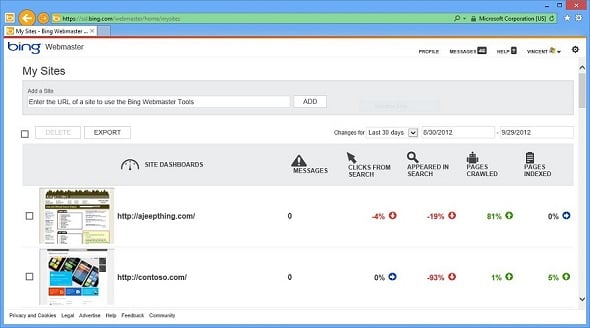
Bing offers analytical tools similar to those of Google analytics but related to the Bing search. Of course, to get access you need to create an account or use your Microsoft account if you have one. After you’ve logged in and added your website to the Bing Webmaster account you can get SEO reports on your website. Bing offers two different analytical tools. These are SEO Reports used for a full website overview and a lighter SEO Analyzer that suggests on-demand analytics for any page you wish to check.
Semrush
Great analytical tool that provides a broad range of reports on the website ranking positions, backlinks, keywords etc. As with many other tools, you may only get a full analytic report with subscribing to one of the paid plans. Analytic requests for unregistered users are limited to a small number every day.
Backlinks Tracking Tools

Backlinking is an important factor for website popularity assessment. Backlinks play one of critical parts in SEO showing the website’s popularity, trustworthiness and importance. Tracking natural backlinking helps in building a strong online campaign to improve website’s Page Rank scores
This amazing resource has a few pricing plans including a free account with limited functionality. But in many cases this may be enough for tracking backlinks to your website from other resources as well as from social media platforms.
This amazing resource has a few pricing plans including a free account with limited functionality. But in many cases this may be enough for tracking backlinks to your website from other resources as well as from social media platforms.

Comments
Post a Comment